How to Get Your Facebook Stream Key
Your Facebook stream key is what lets Cricket Scorer broadcast your cricket match directly to Facebook Live — no OBS, no laptop, no third-party software. This guide shows you exactly where to find it, whether you're streaming to your personal profile, a Facebook Group, or a club Page.
Quick answer
On Facebook, go to Create Post → Live Video → Use stream key. Facebook will show your Server URL and Stream Key. Copy the Stream Key and paste it into Cricket Scorer's Live tab under Facebook Stream Key. Tap Start Camera then GO LIVE.
You'll need
- ✓A Facebook account
- ✓Cricket Scorer installed
- ✓A mobile or desktop browser
Time needed
~5 min
No waiting period like YouTube — you can go live straight away
Cost
Free
Facebook Live and Cricket Scorer streaming are both free
Facebook vs YouTube for cricket streaming
Facebook has one key advantage over YouTube for local cricket: no 24-hour waiting period. You can set up a stream key and go live immediately. It's also easier to share with a private group — ideal if you want only your mates or club members to watch. YouTube is better if you want the stream to be publicly searchable after the match.
First: decide where on Facebook you want to stream
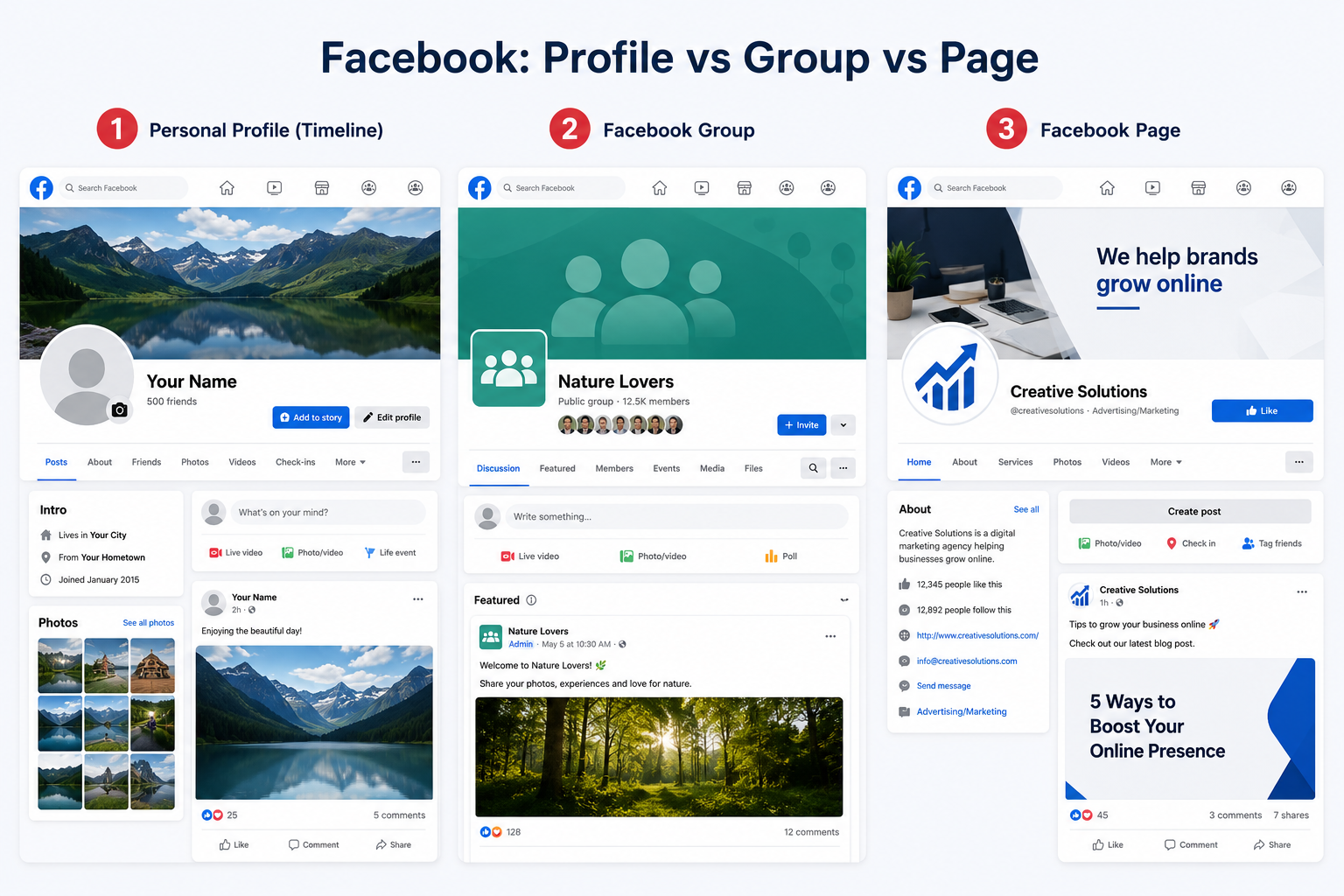
Unlike YouTube, Facebook lets you stream to three different destinations. Pick the right one before you grab your stream key, because each one gives you a slightly different key.
Personal profile
Stream appears on your personal timeline. Your Facebook friends can watch. Good for a quick match if your mates are already connected with you.
Best for: casual games
Facebook Group
Stream goes into your cricket group's feed. Only members can watch. Perfect for a regular Saturday/Sunday group — keeps streams together in one place.
Best for: regular cricket groups
Facebook Page
Stream on your club or team's public Facebook Page. Anyone can watch, and the stream stays on your Page permanently after the match.
Best for: clubs with a public page
How to find your Facebook stream key — step by step
Sign in to Facebook
Go to facebook.com on your phone or desktop and sign in to the account you want to stream from. If you're streaming to a Group or Page, make sure you're an admin or have permission to post live videos there.
On mobile or desktop? The steps below work on both, but Facebook's desktop interface gives you more options and is easier to navigate for first-time setup. Do the setup on desktop, then use Cricket Scorer on your phone to stream.
Navigate to where you want to stream
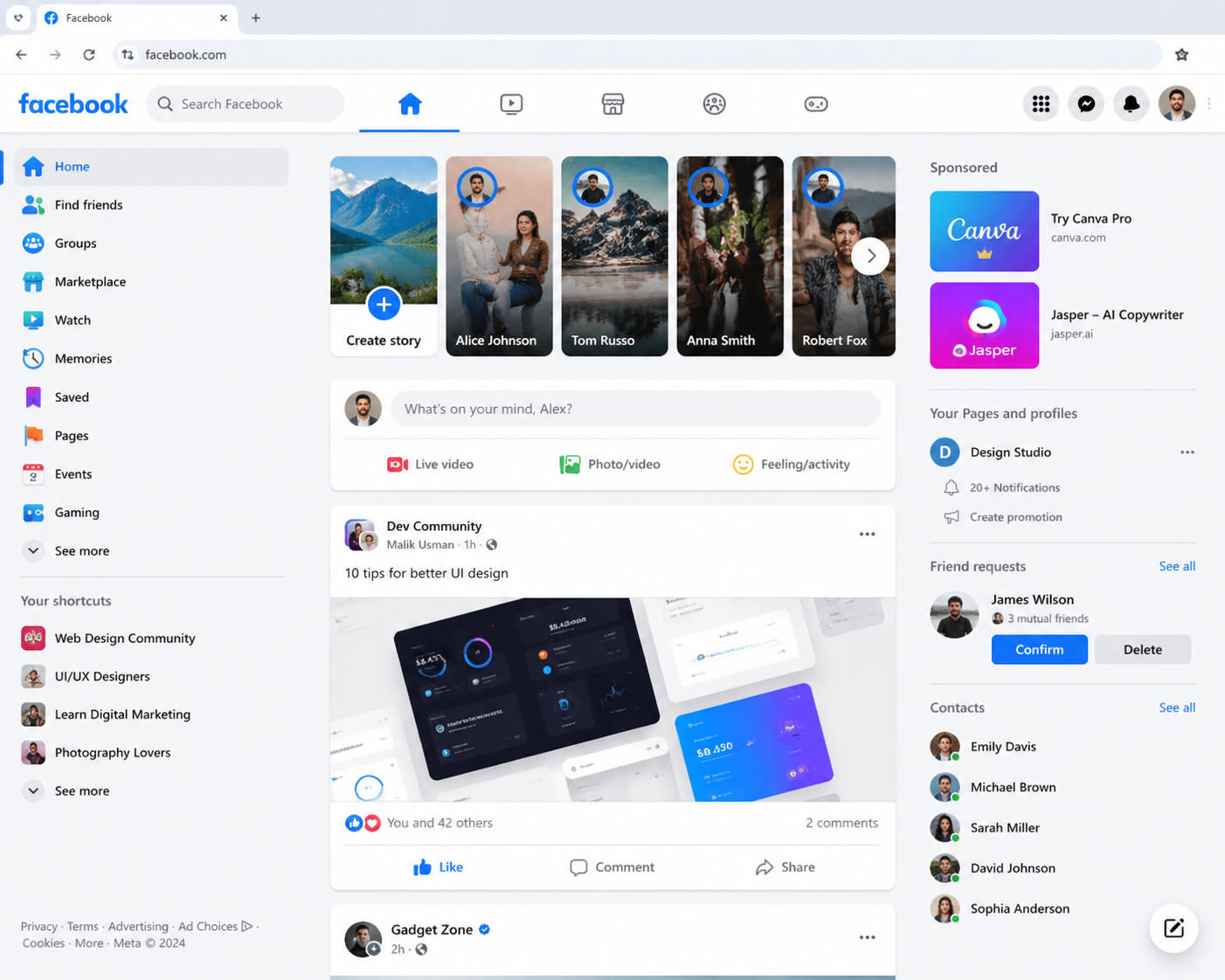
Go to the Facebook destination you chose in the previous section — your personal profile, your Group, or your Page. The Live option appears slightly differently depending on where you are:
- → Personal profile: Click What's on your mind? to open the Create Post box, then look for the Live video option.
- → Facebook Group: Go to the Group, click Write something or the media icons, then select Live video.
- → Facebook Page: Go to your Page, click Create post, then select Live video.
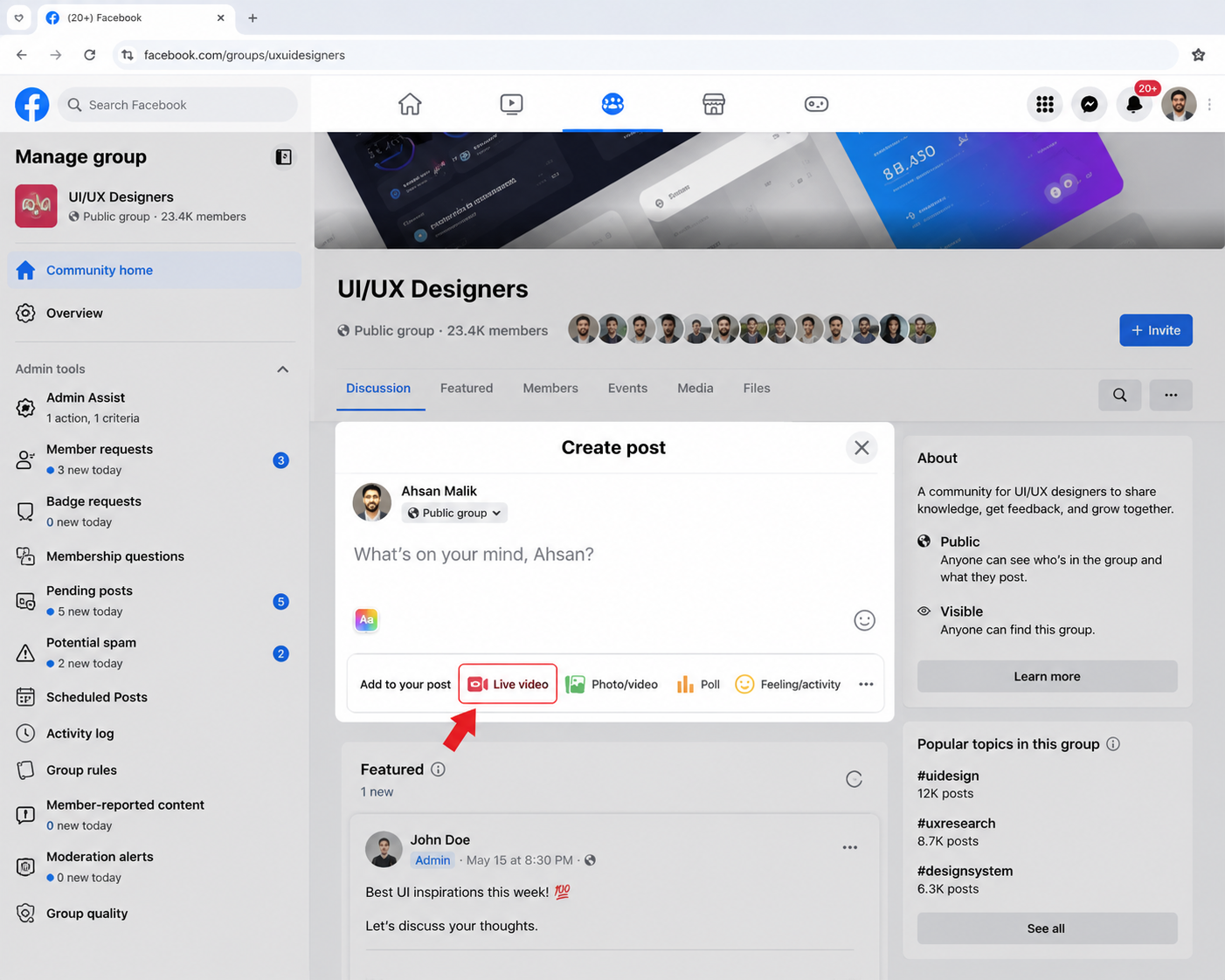
Select "Use stream key" — not Go Live Now
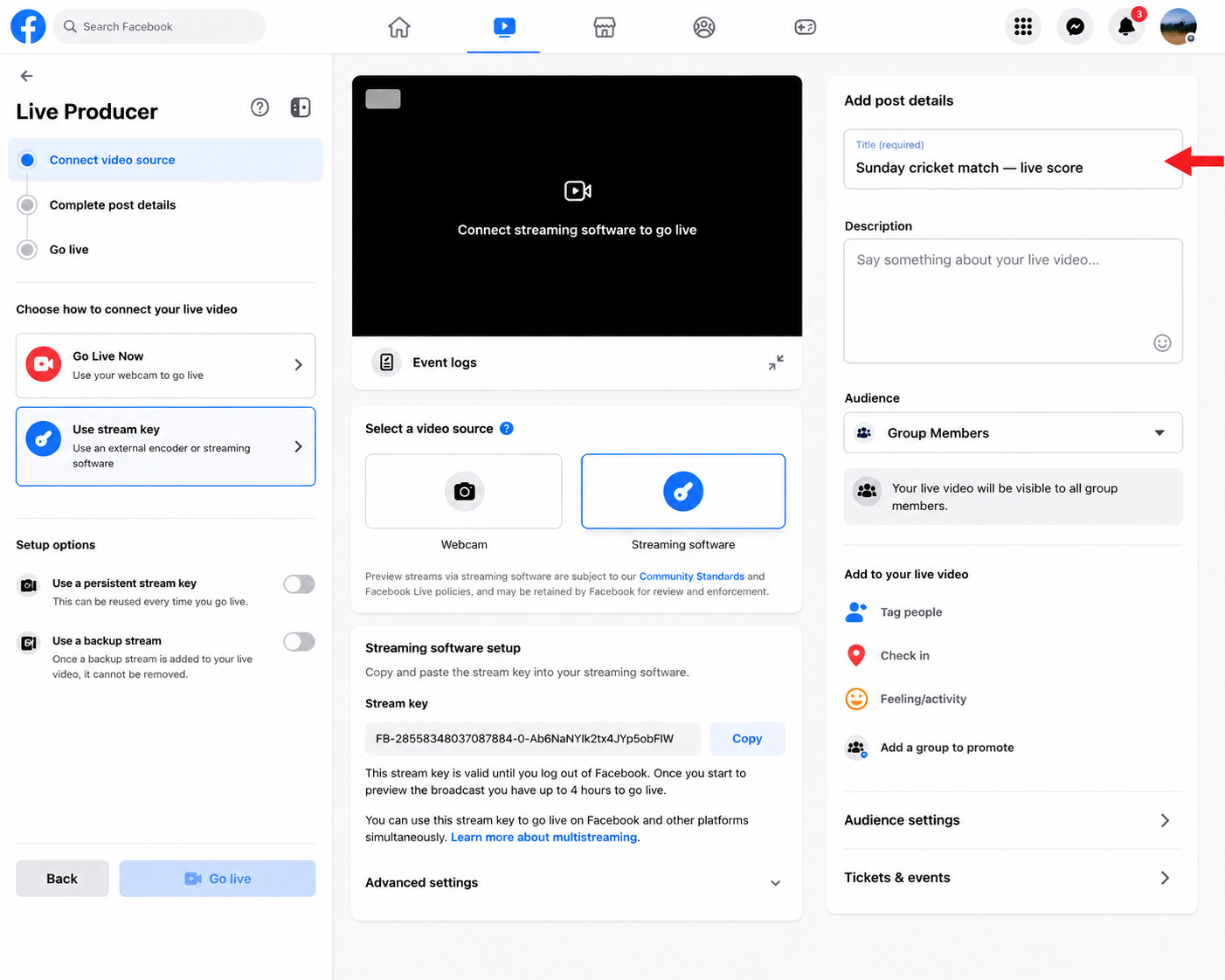
Facebook will show you the Live Producer screen. On the left side you'll see two options: Go Live Now (uses your device camera directly in the browser) and Use stream key (uses an external encoder — which is what Cricket Scorer is). Click Use stream key.
Don't click "Go Live Now". That option only works with Facebook's built-in browser camera — it won't let you use Cricket Scorer. You need Use stream key to get the RTMP details.
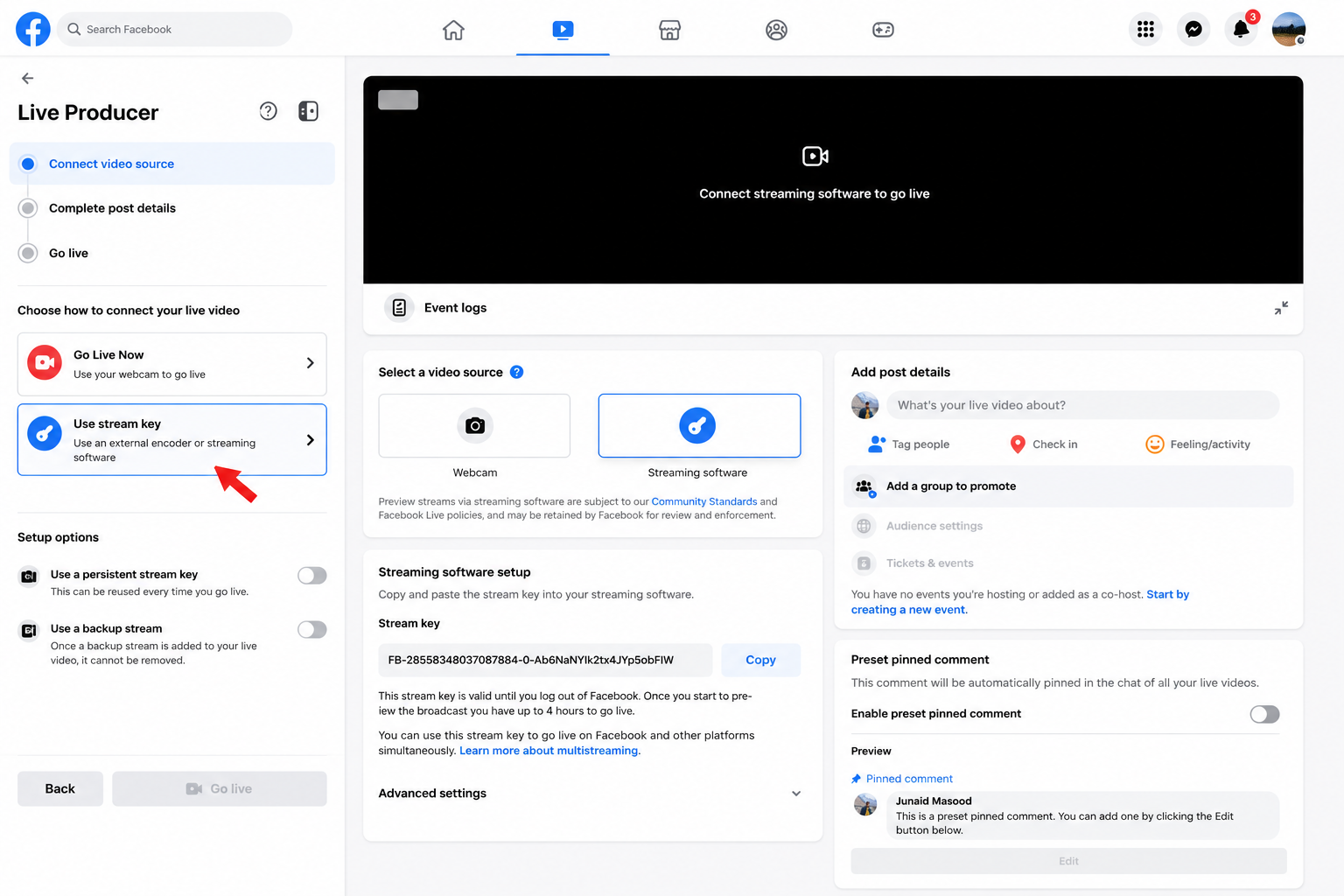
Copy your Server URL and Stream Key
After selecting Use stream key, Facebook will display two fields: a Server URL and a Stream Key. You need the Stream Key — click Copy next to it.
What you'll see on Facebook
Server URL
rtmps://live-api-s.facebook.com:443/rtmp/
CopyStream Key ← This is what you need
••••••••••••••••••••••••••
CopyNever share your stream key publicly. Anyone who has it can stream to your Facebook account or Page. If it's ever compromised, go back to Facebook Live and generate a new one.
Facebook stream key expiry
Unlike YouTube's persistent key, Facebook stream keys can expire — especially if you scheduled the stream in advance and the start time has passed, or if the stream wasn't used for an extended period. If your key stops working, go back to Facebook Live and copy a fresh one.
Add a title and description for your stream
Before you go live, fill in the title and description fields on the Facebook Live Producer screen. These appear on Facebook so your Group members or followers know what the stream is. Use something clear like "Sunday Smashers vs Park Lane XI — Live Cricket" so it's obvious when they see it in their feed.
Set visibility before going live. Make sure the post visibility matches where you want it — Friends, Group members only, or Public. You can't easily change this once the stream has started.
Keep the Facebook tab open — don't close it
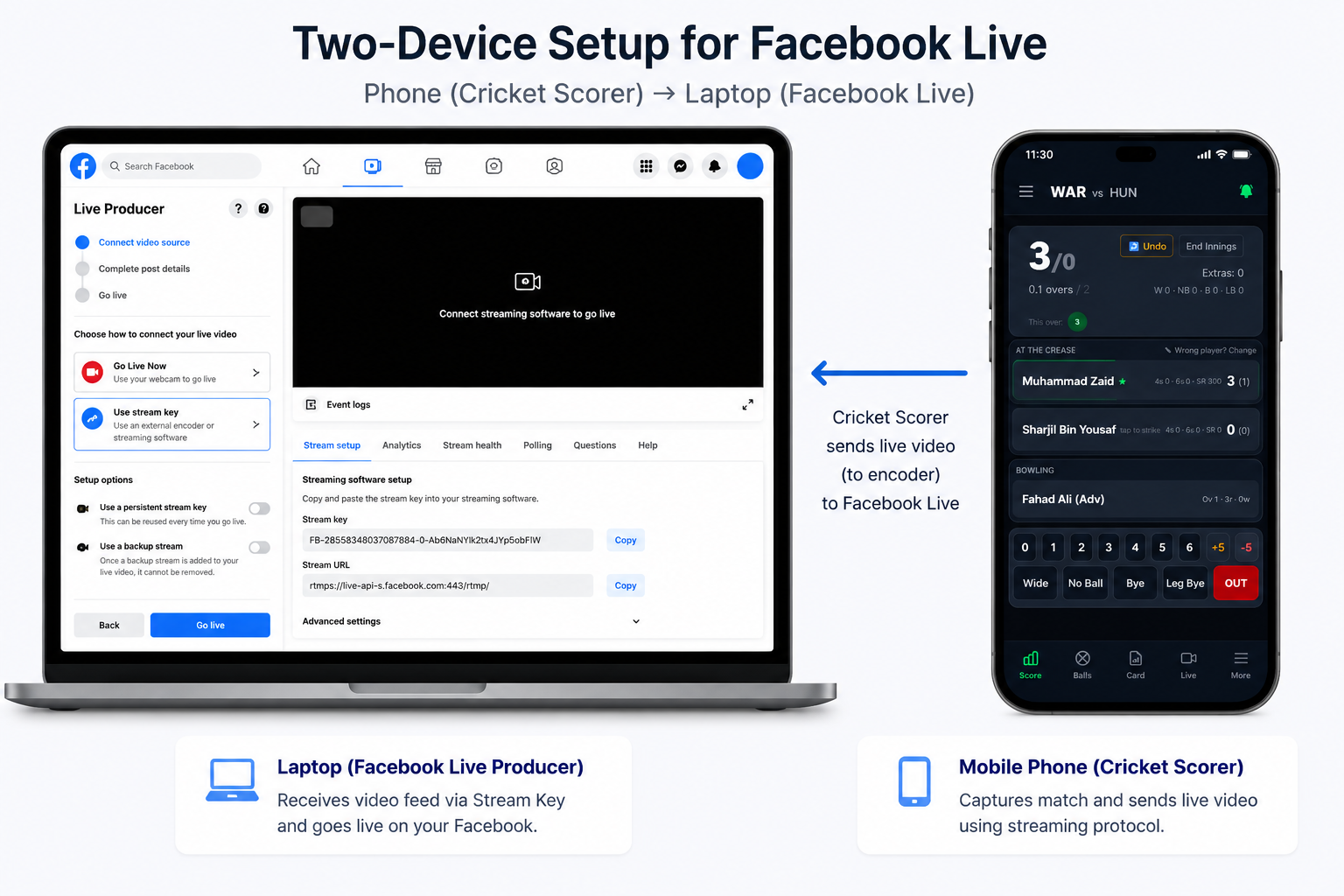
Leave the Facebook Live Producer tab open in your browser while you switch to Cricket Scorer on your phone. Facebook is waiting for your stream signal — it will show a preview screen once Cricket Scorer connects. The stream will only go public on Facebook when you click Go Live in Facebook Live Producer, after Cricket Scorer has connected.
Two-device workflow: Run Facebook Live Producer on your laptop or tablet to monitor the stream preview and click Go Live. Run Cricket Scorer on your phone as the camera and scorer. This is the most reliable setup on a Saturday matchday.
Paste your stream key into Cricket Scorer and go live Final step
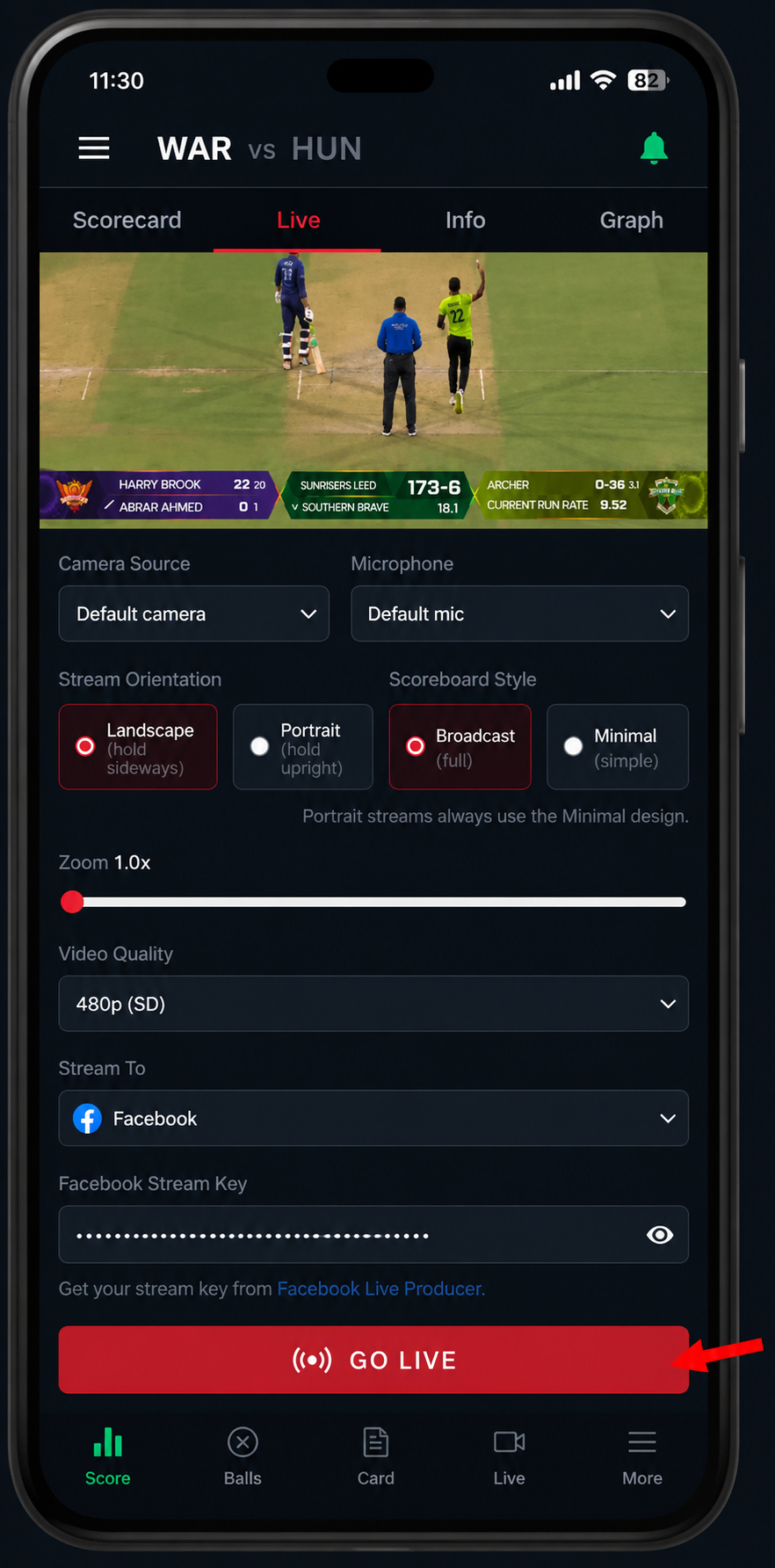
Open Cricket Scorer on your phone. Tap the Live tab at the bottom. In the Stream To dropdown, select Facebook. Tap the Facebook Stream Key field and paste the key you copied from Facebook. Set your camera source, microphone, orientation and video quality.
Tap Start Camera to check the framing, then tap GO LIVE. Cricket Scorer will connect to Facebook — within a few seconds the preview on your Facebook Live Producer tab will show your camera feed. When you're happy with it, click Go Live on Facebook to publish the stream to your Group, Page, or profile.
Share the link in your WhatsApp group. Once you're live, copy the Facebook Live video URL from the Facebook tab and drop it in the group chat — it's easier than asking everyone to find it themselves in their feeds.
Facebook Live vs YouTube Live for cricket — which is better?
Cricket Scorer supports both. The right choice depends on how you want your group to watch.
| Facebook Live | YouTube Live | |
|---|---|---|
| Setup time (first use) | ~5 minutes, go live immediately | 24-hour wait for first stream |
| Best audience reach | Private Group or friends | Public / searchable |
| Stream key expires? | Can expire — check before match day | Persistent key — reuse every time |
| VOD after the match | Saved to your profile/Page/Group | Saved to your YouTube channel |
| Ideal for | Friends groups, club members | Building a public cricket audience |
For most Saturday and Sunday cricket groups in the UK, Facebook is the easier starting point — your group is probably already on Facebook, there's no waiting period, and you can keep streams private to members. Move to YouTube when you want public visibility.
Common questions
Where do I find my Facebook stream key?
Go to your Facebook profile, Group, or Page → Create Post → Live Video → Use stream key. Facebook will show your Server URL and Stream Key. Copy the Stream Key and paste it into Cricket Scorer.
Can I stream to a Facebook Group instead of my personal profile?
Yes — and it's the recommended option for cricket groups. Navigate to your Group, create a Live Video post from there, and select Use stream key. The stream and the stream key will be tied to that Group.
Does my Facebook stream key expire?
Yes, Facebook stream keys can expire — especially if you set up a scheduled stream in advance and didn't use it, or if the key has been inactive for a long time. Always grab a fresh key on the day of your match to be safe.
Do I need a Facebook Page to stream cricket?
No — you can stream from a personal profile or a Group. A Facebook Page is optional but useful if you want a public-facing presence for your club. For most UK cricket groups, a private Group is the easiest and most practical option.
What if Cricket Scorer isn't connecting to Facebook Live?
First, check that the Facebook Live Producer tab is still open and hasn't timed out. Then verify your stream key hasn't expired — go back to Facebook and copy a fresh one. Also make sure you have a stable 4G or Wi-Fi connection — 1.5 Mbps minimum is needed for reliable streaming.
Why isn't the "Use stream key" option appearing on Facebook?
The Use stream key option only appears in Facebook Live Producer on desktop — not in the Facebook mobile app. If you can't see it, open Facebook in a desktop browser (Chrome or Firefox) rather than the app on your phone.
Next steps
Stream key copied — you're ready
Install Cricket Scorer, paste your Facebook stream key into the Live tab, and broadcast your next Saturday or Sunday match — free, from your phone, scorecard included.